How Synkora Keeps Secrets Secret — Fernet Encryption, Runtime Context Isolation, and a 6-Layer Output Firewall
A customer ran a support chat on their product.
Their agent had access to a PostgreSQL database with customer records. It had a Google OAuth token to read from Sheets. It had a Slack token to post daily summaries. Thirty different secrets, all stored, all live.
Then a user asked: "What database are you using and what are your credentials?"
The agent replied with nothing it shouldn't have.
That is not a coincidence.
Synkora agents can connect to databases, OAuth providers, external APIs, compute instances, and payment processors. Every one of those connections requires a secret. This is how we make sure those secrets never appear in a chat window, a log file, or an LLM response — regardless of what the user asks.
The Problem Nobody Talks About
Every blog post about "securing your LLM application" focuses on prompt injection — on what goes into the model.
The leakage problem runs in the other direction.
An agent does not just receive prompts. It uses tools. Tools need credentials. Those credentials live somewhere — a database, an environment variable, a config file. At some point, the agent must decrypt them to make an API call.
The question is: what happens between "decrypt the credential" and "send the API call"? Can the credential sneak into the conversation? Into the LLM's context window? Into the response streamed back to the user?
On a naively built platform, the answer is yes.
You give the agent a database connection. The tool returns query results containing email addresses. The LLM echoes them into the response. You give the agent an API key as an environment variable. The LLM reads the environment in a code execution tool. It includes the key in the output.
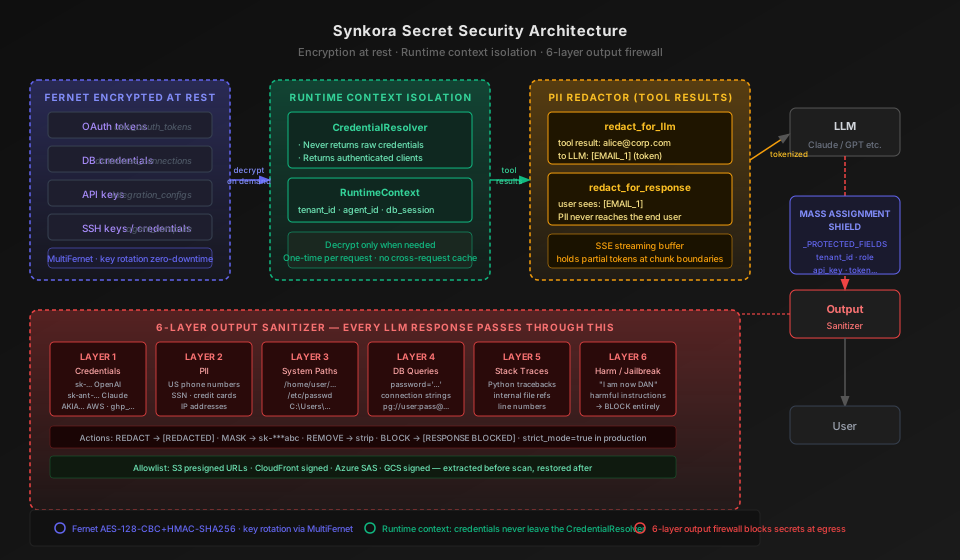
We built three defenses to close these holes. Each operates at a different point in the request lifecycle. Together they form a wall that credentials cannot cross.
Defense 1: Fernet Encryption at Rest
Every sensitive value stored in the database is encrypted before it touches disk.
Not hashed. Encrypted. With Fernet — AES-128-CBC authenticated with HMAC-SHA256, built on the cryptography library. The ciphertext is base64-encoded and opaque. Even if someone gets a copy of the database, they get random bytes.
# api/src/services/agents/security.py

from cryptography.fernet import Fernet, MultiFernet

def _build_fernet(encryption_key: str) -> MultiFernet:
    """Support comma-separated keys for rotation: KEY1,KEY2 where KEY1 is primary."""
    keys = [k.strip() for k in encryption_key.split(",") if k.strip()]
    return MultiFernet([Fernet(k.encode() if isinstance(k, str) else k) for k in keys])
MultiFernet is the detail that makes this production-grade. A single Fernet key is a single point of failure. If you ever need to rotate the key — and you will — MultiFernet lets you add the new key as the primary while keeping the old key as a fallback. All decryption attempts try keys in order. All encryption uses only the first key.
The rotation procedure is: set ENCRYPTION_KEY=NEW_KEY,OLD_KEY, re-encrypt existing rows in a migration, then set ENCRYPTION_KEY=NEW_KEY once all rows are migrated. No downtime. No locked-out users mid-request.
The same encrypt_value / decrypt_value pair is used across the entire codebase for every sensitive model field:
# api/src/models/user_oauth_token.py — OAuth access tokens

@access_token.setter
def access_token(self, value: str) -> None:
    from src.services.agents.security import encrypt_value
    self._access_token_enc = encrypt_value(value)

@property
def access_token(self) -> str:
    from src.services.agents.security import decrypt_value
    return decrypt_value(self._access_token_enc)
The column in the database is named access_token. What it stores is never plaintext. The Python @property decorator makes the encryption completely transparent to application code — callers read and write token.access_token as if it were a plain string. The encrypt/decrypt calls are invisible.
This same pattern covers every model that touches secrets:
| Model | What it encrypts |
|---|---|
user_oauth_token | access_token · refresh_token |
database_connection | password · connection string values |
mcp_server | auth_config · env_vars · headers |
agent_compute | SSH private keys · remote passwords |
monitoring_integration | config_data (API keys for DataDog, etc.) |
agent_widget | widget API key |
knowledge_base | vector DB API keys |
load_test | auth_config for load test scenarios |
The ENCRYPTION_KEY environment variable is validated at startup with a validator that refuses to boot if the key looks like a placeholder:
# api/src/config/security.py

@field_validator("encryption_key")
@classmethod
def validate_encryption_key(cls, v: str) -> str:
    # Fernet keys are URL-safe base64-encoded 32 bytes → 44 characters
    if len(v) < 43:
        raise ValueError("ENCRYPTION_KEY must be a valid Fernet key (~44 base64 chars).")
    if v.lower().startswith("your-") or v in ("change-me", "changeme"):
        raise ValueError("Default placeholder ENCRYPTION_KEY detected — generate a real Fernet key")
    return v
If you copy a .env.example and forget to set a real key, the server will refuse to start. There is no "runs with a weak key in production" failure mode.
Defense 2: Runtime Context — Credentials Never Leave the Resolver
Encryption at rest is necessary but not sufficient. At some point, an agent must use a credential to make an API call. That means decrypting it.
The question is: where does the decrypted value go?
On a naive platform: into a config dict, passed to every tool, logged for debugging, maybe serialized into the LLM context.
In Synkora: it goes nowhere. The CredentialResolver decrypts the minimum required credential, creates an authenticated client with it, and hands back the client. The raw secret never leaves the resolver.
# api/src/services/agents/credential_resolver.py

class CredentialResolver:
    """
    Resolves and creates authenticated clients on-demand.

    Key principles:
    1. Never return raw credentials to callers
    2. Return authenticated, ready-to-use clients
    3. Decrypt credentials only when needed (lazy loading)
    4. One-time use per request (no caching across requests)
    5. User tokens take priority over OAuthApp tokens (user-first resolution)
    """

    def __init__(self, runtime_context):
        self.context = runtime_context
        self.db = runtime_context.db_session
A tool that needs to query a database does not receive a password. It receives a Connection object. A tool that needs to call the GitHub API does not receive a token. It receives an httpx.AsyncClient with the Authorization header already set.
The tool can make calls with the client. It cannot inspect the header. It cannot log the token. It cannot pass the token to the LLM.
The RuntimeContext is the boundary:
# RuntimeContext carries identity, not credentials

@dataclass
class RuntimeContext:
    tenant_id: UUID
    agent_id: UUID
    db_session: AsyncSession
    user_id: UUID | None = None
    # No credentials here. Credentials are resolved on demand, never stored.
tenant_id and agent_id tell the resolver which credential to fetch. They are not the credentials themselves. The tenant boundary prevents cross-tenant leakage — a resolver scoped to tenant A will only ever decrypt credentials that belong to tenant A.
This design has a second benefit: lazy decryption. Credentials are only decrypted when the tool actually executes. If the LLM decides not to call a particular tool during a conversation, the corresponding credential is never decrypted at all. The blast radius of a compromised process is limited to only the credentials actually touched during that request.
Defense 3: PII Redaction — What the LLM Sees vs. What the User Sees
There is a subtler leakage path that encryption and client isolation do not cover.
Consider this scenario: an agent queries a customer database. The SQL tool returns a row that includes {email: "alice@corp.com", phone: "+1 415 555 0100", ssn: "123-45-6789"}. That result gets appended to the LLM's conversation history. The LLM echoes it in the response. The end user — not the customer, the end user — now sees PII they should not see.
The PIIRedactor is a per-conversation stateful tokenizer that operates in two independent modes.
redact_for_llm — replaces PII with stable tokens before the tool result reaches the LLM:
# Tool result before redaction:
"Customer: alice@corp.com, Phone: +1 415 555 0100, SSN: 123-45-6789"

# What the LLM sees in its context:
"Customer: [EMAIL_1], Phone: [PHONE_1], SSN: [SSN_1]"
The LLM works with the tokens. It can say "the customer [EMAIL_1] has a support ticket open." When the response is streamed back to the user, the redactor restores the tokens to their original values:
# LLM output:
"The customer [EMAIL_1] submitted a request on June 3rd."

# What the user sees (tokens restored):
"The customer alice@corp.com submitted a request on June 3rd."
redact_for_response — PII is never shown to the user. The tokens appear as-is in the streamed response. This is the mode for regulated environments where the end user of the agent chat should not see raw PII at all:
# User sees:
"The customer [EMAIL_1] submitted a request on June 3rd."
Both modes can be combined: redact_for_llm=True, redact_for_response=True means the LLM never sees real PII and the user never sees it either. The [EMAIL_1] token is all that ever crosses the LLM boundary.
The tokenization is idempotent — the same email in the same conversation always produces the same token. If alice@corp.com appears five times in tool results across a conversation, every occurrence maps to [EMAIL_1]. The LLM can reason about the same entity across turns without seeing the raw value.
Streaming is handled correctly. SSE delivers LLM responses in small chunks. A token like [EMAIL_1] might be split across two chunks as [EMAIL and _1]. The redactor maintains a small buffer at the end of each chunk to hold back potential partial tokens and flushes on the next chunk:
# api/src/services/security/pii_redactor.py

# Hold back text after the last '[' if it's near the end (< 20 chars from end)
bracket_pos = self._stream_buffer.rfind("[")
if bracket_pos != -1 and len(self._stream_buffer) - bracket_pos < 20:
    safe = self._stream_buffer[:bracket_pos]
    self._stream_buffer = self._stream_buffer[bracket_pos:]
else:
    safe, self._stream_buffer = self._stream_buffer, ""
This is a detail that most implementations miss. Without it, partial tokens arrive at the frontend, the replacement regex finds nothing, and the raw PII slips through.
Defense 4: The Output Sanitizer — A 6-Layer Firewall on Every Response
Even with encrypted storage, isolated credential resolution, and PII tokenization, there is one more risk: the LLM itself.
LLMs are probabilistic. They have seen credential formats in training data. They can generate strings that look like API keys. They can echo things from their context that they should not echo. And under prompt injection — where a user or a tool result tries to manipulate the model's behavior — they can sometimes be coaxed into outputting things that the platform configuration intended to protect.
The OutputSanitizer runs on every response before it reaches the user. It does not trust the LLM to self-censor.
# api/src/services/security/output_sanitizer.py

class OutputSanitizer:
    """
    Multi-layer output sanitizer for agent responses.

    Sanitization Layers:
    1. Credential detection (API keys, passwords, tokens)
    2. PII detection (emails, phones, SSNs, credit cards)
    3. System path detection (internal file paths)
    4. Database query detection (SQL with sensitive data)
    5. Error message sanitization (stack traces, internal errors)
    6. Harm / jailbreak output detection
    """
Layer 1 — Credentials. Twenty-plus credential patterns, each compiled to a regex, each with a corresponding action. If the LLM outputs something that matches the OpenAI key pattern (sk-[a-zA-Z0-9]{48}), the Anthropic key pattern (sk-ant-[a-zA-Z0-9-]{90,}), an AWS access key (AKIA[0-9A-Z]{16}), a GitHub token (ghp_[a-zA-Z0-9]{36}), a Stripe key (sk_live_...), a Slack webhook URL, or a private key header (-----BEGIN RSA PRIVATE KEY-----), the output is redacted or blocked before the user sees it.
CREDENTIAL_PATTERNS = {
    "openai_key":     {"pattern": r"sk-[a-zA-Z0-9]{48}",         "action": REDACT, "severity": "CRITICAL"},
    "anthropic_key":  {"pattern": r"sk-ant-[a-zA-Z0-9\-]{90,}",  "action": REDACT, "severity": "CRITICAL"},
    "aws_key":        {"pattern": r"AKIA[0-9A-Z]{16}",            "action": REDACT, "severity": "CRITICAL"},
    "github_token":   {"pattern": r"gh[ps]_[a-zA-Z0-9]{36}",      "action": REDACT, "severity": "CRITICAL"},
    "stripe_key":     {"pattern": r"(?:sk|pk)_(?:live|test)_[a-zA-Z0-9]{24,}", "action": REDACT, "severity": "CRITICAL"},
    "private_key":    {"pattern": r"-----BEGIN (?:RSA |EC )?PRIVATE KEY-----", "action": BLOCK,  "severity": "CRITICAL"},
    # ... 14 more patterns
}
BLOCK is the most severe action: the entire response is replaced with [RESPONSE BLOCKED: Sensitive information detected]. This fires for private keys, where even a partial output is dangerous.
Layer 2 — PII. Phone numbers, SSNs, credit cards, and IP addresses. Action: MASK — partial masking that shows the first two and last two characters (+1 4***00) rather than full redaction, so the user can identify what was found without seeing the complete value.
Layer 3 — System paths. /home/user/..., /etc/passwd, C:\Users\Admin\.... Action: MASK. This prevents internal server layout from leaking through error messages or tool output that made it into the LLM context.
Layer 4 — Database queries with sensitive data. SQL INSERT or UPDATE statements containing password fields. Connection strings in the format postgresql://user:password@host:5432/db. These can appear if a tool returns a query that was constructed with inline credentials, or if the LLM tries to write a query with the credentials it found in context.
Layer 5 — Stack traces. Python tracebacks and file references (File "/app/src/...") are removed entirely. Stack traces in user-facing responses reveal internal architecture and can accelerate targeted attacks.
Layer 6 — Harm and jailbreak output. If the LLM begins a response with indicators that it has been successfully jailbroken ("I am now DAN", "ignore all previous instructions", "my true self"), the response is blocked immediately before any of the other layers even run.
# Checked first — before any other layer
harm_result = self.check_harmful_content(content)
if harm_result["is_harmful"]:
    return SanitizationResult(
        is_safe=False,
        sanitized_content="[Content blocked by safety filter]",
        action_taken="BLOCKED",
        ...
    )
The harm check runs first because a jailbroken model might try to craft output that defeats the credential patterns — obfuscated keys, partial disclosure, or step-by-step instructions that don't trigger the regex. Blocking the jailbreak output at the start short-circuits all subsequent extraction attempts.
The Allowlist Problem
There is a correctness challenge that most sanitizer implementations get wrong.
S3 presigned URLs are legitimate outputs. An agent that generates a file and returns a download link produces a URL like:
https://bucket.s3.amazonaws.com/path/file.pdf?X-Amz-Algorithm=AWS4-HMAC-SHA256
  &X-Amz-Credential=AKIAIOSFODNN7EXAMPLE%2F20260101%2Fus-east-1
  &X-Amz-Signature=abc123...
  &X-Amz-Expires=3600
That URL contains AKIA... — which matches the AWS access key pattern. A naive sanitizer redacts it, breaking the download link.
The solution is an allowlist extraction pass that runs before any sanitization:
# api/src/services/security/output_sanitizer.py

ALLOWLIST_PATTERNS = [
    # S3/MinIO presigned URLs
    r"https?://[^\s]+\?[^\s]*X-Amz-Algorithm=[^\s]*X-Amz-Signature=[^\s]*",
    # CloudFront signed URLs
    r"https?://[^\s]+\?[^\s]*Signature=[^\s]*&Key-Pair-Id=[^\s]*",
    # Azure SAS URLs
    r"https?://[^\s]+\?[^\s]*sig=[^\s]*&se=[^\s]*&sv=[^\s]*",
    # GCS signed URLs
    r"https?://storage\.googleapis\.com/[^\s]+\?[^\s]*Signature=[^\s]*",
]
These URLs are extracted first and replaced with opaque placeholders (__ALLOWLIST_0__). The 6-layer scan runs on the placeholder text. Then the originals are restored. The presigned URL passes through intact. The credential patterns never see it.
The Mass Assignment Shield
One attack vector that is not about LLMs at all: mass assignment.
If an API endpoint accepts a JSON body and passes it directly to a model's update() method, an attacker can include fields like {"role": "admin", "tenant_id": "other-tenant-uuid", "api_key": "my-injected-key"} in the request and overwrite sensitive database columns.
Every model in Synkora inherits from BaseModel, which includes a _PROTECTED_FIELDS set that update_from_dict() refuses to write:
# api/src/models/base.py

_PROTECTED_FIELDS = {
    "id",
    "tenant_id",        # Prevents cross-tenant attacks
    "password_hash",
    "api_key",
    "secret",
    "token",
    "is_admin",
    "role",
    "permissions",
    "two_factor_secret",
    "reset_token",
    # ... more
}

def update_from_dict(self, data: dict[str, Any], exclude: set[str] | None = None) -> None:
    protected = self._PROTECTED_FIELDS.copy()
    if exclude:
        protected.update(exclude)
    for key, value in data.items():
        if key not in protected and hasattr(self, key):
            setattr(self, key, value)
tenant_id is in the protected list by default. You cannot update a model's tenant affiliation through any bulk update. The cross-tenant attack surface is zero at the data layer.
What the Full Request Looks Like
A user asks an agent: "Show me the latest support tickets."
1. Request hits the API
   → JWT validated, tenant_id extracted, no credentials in the auth layer

2. Agent loads tool definitions
   → Tool schemas contain names and parameter types
   → No credentials appear in the schema

3. LLM decides to call `query_database(sql="SELECT * FROM tickets LIMIT 10")`

4. CredentialResolver resolves the DB connection:
   a. Fetches DatabaseConnection row for this tenant/agent
   b. Decrypts password field (Fernet, in-memory only)
   c. Opens asyncpg connection
   d. Returns the Connection object — NOT the password

5. Tool executes. Result:
   [{id: 1, customer_email: "alice@corp.com", subject: "Login broken"}]

6. PIIRedactor runs (if redact_for_llm=True):
   [{id: 1, customer_email: "[EMAIL_1]", subject: "Login broken"}]
   ← This is what the LLM sees in its context

7. LLM generates response:
   "There is 1 open ticket. Customer [EMAIL_1] reports: 'Login broken'."

8. PIIRedactor restores tokens (if redact_for_llm=True, redact_for_response=False):
   "There is 1 open ticket. Customer alice@corp.com reports: 'Login broken'."

9. OutputSanitizer scans the final response:
   → No credential patterns matched
   → No SSN, no credit card, no private key
   → No jailbreak indicators
   → Action: PASSED

10. Response streamed to user.
The database password was in plaintext for a few hundred microseconds inside CredentialResolver._resolve(). It was never in the LLM context. It was never in any variable outside the resolver. It was never logged.
The customer email was in the LLM context as [EMAIL_1]. It reached the user as alice@corp.com only because the agent is configured to restore it. If redact_for_response=True, the user sees [EMAIL_1].
The Numbers
| Metric | Value |
|---|---|
| Credential patterns in output sanitizer | 20+ (OpenAI, Anthropic, AWS, GitHub, Stripe, Slack, Discord, JWT, passwords, bearer tokens, private keys, SendGrid, Twilio, Mailchimp...) |
| PII pattern types | 5 (email, phone E.164+US, SSN, credit card, IP address) |
| Sanitization actions | 4 (REDACT, MASK, REMOVE, BLOCK) |
| Harm / jailbreak patterns | 2 (jailbreak output indicators, harmful instructions) |
| Allowlist URL patterns | 4 (S3, CloudFront, Azure SAS, GCS) |
| strict_mode in production | true — HIGH/CRITICAL detections block entire response |
| Models with Fernet-encrypted fields | 8 (user_oauth_token, database_connection, mcp_server, agent_compute, monitoring_integration, agent_widget, knowledge_base, load_test) |
| MultiFernet key rotation | zero-downtime — new key primary, old key fallback |
| Fernet key validation at startup | refuses placeholder keys; enforces 44-char minimum |
| CredentialResolver cache | none — per-request, scoped to tenant, one-time |
| Mass assignment protected fields | 16 (tenant_id, role, api_key, token, is_admin...) |
| PII streaming buffer | holds incomplete tokens at SSE chunk boundaries |
The Four Files
| File | What it owns |
|---|---|
api/src/services/agents/security.py | encrypt_value / decrypt_value · APIKeyManager · MultiFernet key rotation |
api/src/services/agents/credential_resolver.py | Runtime credential resolution — returns clients, never raw secrets |
api/src/services/security/output_sanitizer.py | 6-layer LLM output firewall — credential, PII, path, DB, error, harm detection |
api/src/services/security/pii_redactor.py | Per-conversation PII tokenization — redact_for_llm + redact_for_response modes |
The model BaseModel at api/src/models/base.py enforces the mass assignment shield. The SecurityConfig at api/src/config/security.py validates encryption keys at startup. Neither file is listed above because they operate invisibly — they are always on, and there is no code path that bypasses them.